Built to Work Together
App Builder provides a complete toolbox of 65+ customizable Ignite UI components in a visual drag-and-drop editor – the fastest way to build your next web app. Everything you create generates production-ready code for modern web frameworks, giving you full ownership and the freedom to innovate faster without sacrificing quality.
Book a Demo Try App Builder
Why Ignite UI Users are Upgrading to App Builder
Since you are already using Ignite UI components, the transition to App Builder is seamless, giving you a faster and more intuitive way to craft complete apps, without starting from scratch in code. Align design and development in a single working environment where teams can collaborate, bridging the gap for the entire design-to-code workflow.
AI-Generated Apps with Enterprise-Grade UI
-
Use AI to generate full apps from natural language, including multi-page structures, viewports, navigation, and themes.
-
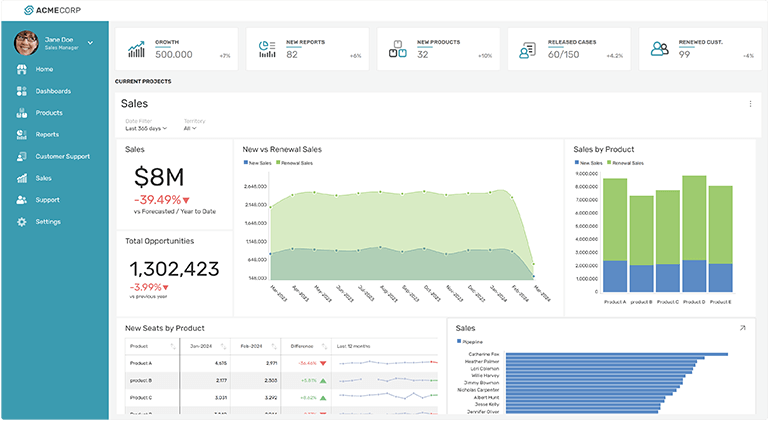
Build complete screens such as dashboards, landing pages, product lists, and e-commerce, or login/register screens.
-
Everything you build is powered by Ignite UI’s high-performance grids, charts, and more, ensuring a consistent, high-quality UI.

Pixel-Perfect, Clean, Usable Code Output
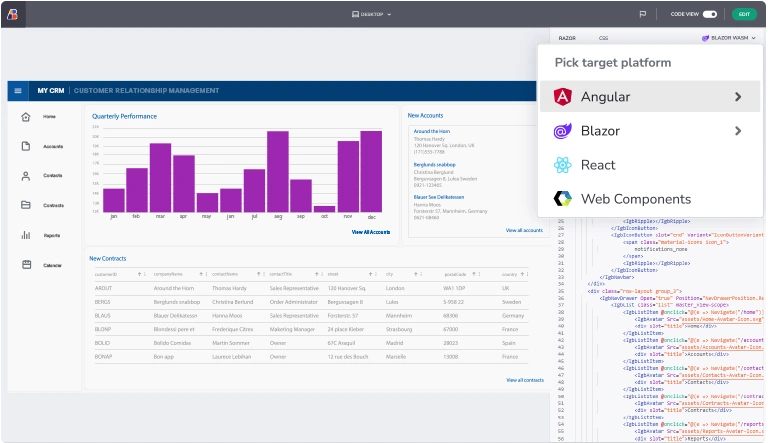
Anything you design or build with our visual app editor can be generated into production-ready code across popular web frameworks: Angular, React, Web Components, and Blazor.
You have ownership of the source code, ensuring long-term maintainability, scalability, and independence. Your app is truly yours to own, scale, and evolve.
Driving New
Revenue
Streams
-
Prevent costly delays or performance issues and accelerate development cycles—helping you capture market share, retain customer attention, and capitalize on revenue opportunities.
-
Reduce your go-to-market costs, eliminate mundane and repetitive tasks, and reallocate your budgets toward innovation and customer expansion.
-
No proprietary functionality, empowering your teams to innovate, customize, and scale without limitations or platform constraints.
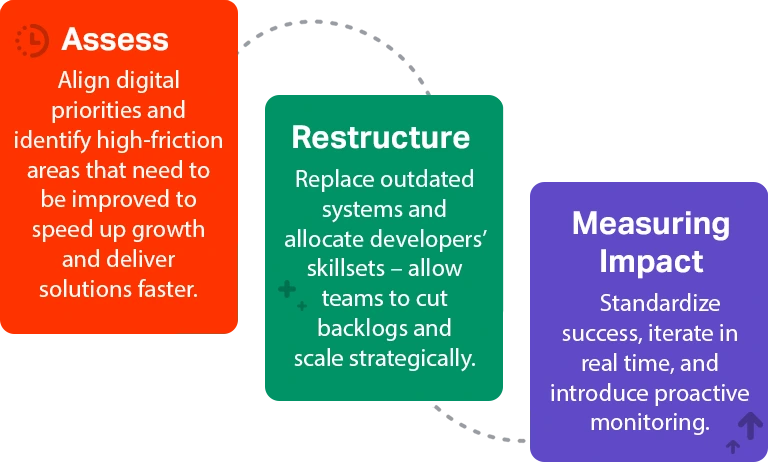
Your 3-Step Approach to Digital Transformation
Enhance Your App Development
Ignite UI gives you feature-packed, enterprise controls, but building full apps still requires manual layout, wiring, code iterations, and design work. With App Builder, you add the missing app development layer for improved and streamlined cycles.


no vendor lock-in
automation, and vibe design
and no handoffs
Accelerate The Way You Build Your Next
Enterprise Application
Creating intuitive applications should be an exciting process of discovery, not an exercise in anxiety. In the past, we watched many of you creatively and cautiously use the ‘Duplicate App’ or ‘Copy to Workspace’ features just to create a manual backup before a major design overhaul. While we always admire our community’s ingenuity, we knew there had to be a better, native way.
Whether you are heavily customizing a complex dashboard, experimenting with new UX layouts, or leveraging AI to auto-generate UI components, you need the freedom to iterate rapidly without the fear of breaking your app.
Today, we are thrilled to introduce a robust Versioning Mechanism to App Builder.
This new feature provides a persistent safety net across your entire workspace, allowing you to capture, browse, and safely restore previous states of your app without data loss.
Before diving into these new functionalities, if this is your first time learning about App Builder, let me quickly share why you should consider it a key tool in the application development process for your organization:
- A visual app builder – the unified platform for C-level executives, enterprise architects, dev team leaders, designers, developers, and stakeholders.
- Cloud-based WYSIWYG drag & drop tool that helps companies design and build complete business apps 80% faster than ever.
- A low-code tool generates production-ready code for Angular, React, Web Components, and Blazor, and converts Figma designs to code.
Why Versioning Matters in a WYSIWYG World
While our session-scoped Undo/Redo is perfect for quick typo fixes, Version History provides a permanent, cross-session timeline of your app’s evolution. As low-code development and AI-assisted design accelerate how quickly you can build, having a structural “save point” is critical.
The new versioning system empowers you to:
- Design with Confidence: Save named checkpoints before testing a risky design overhaul.
- Recover Instantly: Roll back unintended changes instantly, whether made by you or a collaborator.
- Track Your Evolution: View a clear timeline of your application’s lifecycle.
Key Capabilities at a Glance
Our state versioning system efficiently captures your entire App Builder model—including app structure, views, data sources, and your chosen theme—using a lightweight Diff/Delta strategy.
1. Manual Checkpoints for Intentional Saves
Preparing for a major structural change? You can now manually save your app’s state.
- Simply open the app/view context menu and select Save Version.
- Add a custom label (e.g., “Pre-AI UI Generation” or “Stable Dashboard v1”) to easily identify it later.
2. Automatic Snapshots for Peace of Mind
To ensure you never lose your current state when reverting to an older design, App Builder automatically creates a snapshot immediately before you execute a Restore action.
3. Visual Version Browsing
Managing your history is highly visual and intuitive. By clicking Show Version History from the new application name dropdown, a side panel reveals a complete timeline of your work.
- Filter and Group: Quickly find what you need by filtering for My Versions, Named Versions, or grouping by time (e.g., Earlier This Week).
- Take Action: With a single click, you can restore, rename, duplicate, or delete any saved version.
A Smoother Workspace Experience
Alongside Version History, we’ve polished the top-level application menu. You will notice a new, streamlined dropdown menu by clicking your app’s name. From here, you can seamlessly Rename, Duplicate, Copy to Workspace, or access your Version History—all confirmed by clear success toasts without navigating away from your canvas.
Data Retention Under the Hood: To keep your workspace clean, auto-saved versions are retained for 90 days before automatic cleanup. Manually named versions, however, are yours to keep forever and will only be removed if you choose to delete them.
Start Iterating Today
The new Versioning mechanism is live in your App Builder workspace. Jump in, save a checkpoint, and start experimenting with your UI faster and safer than ever before.
For a full breakdown of prerequisites and technical limitations, check out our Official Documentation Link.
Wrapping up
Try the new features today at my.appbuilder.dev
App Builder is a game-changer in the app development process. With its cloud-based visual builder, low-code capabilities, and new features, it’s a must-have tool for any organization. Try it out today! If you need more details, we encourage you to check out our:
To experience everything in the latest App Builder updates, visit your customer portal and get the latest version. As usual, we are always excited to get your feedback and hear what you want to add or recommend. So please email me at zkolev@appbuilder.dev and let me know how we can help you continue delivering value to your customers with Infragistics.